Machine Bloom · Ambassadors
Android test access
Android-teståtkomst
Invited ambassadors can test Full Campaign through Google Play license testing. This is temporary development access—not a free product, gift, or permanent purchase.
Inbjudna ambassadörer kan testa Full Campaign via Google Plays licenstestning. Det är tillfällig utvecklingsåtkomst – inte en gratis produkt, gåva eller permanent köprätt.
Check before continuing
Kontrollera innan du fortsätter
Only continue if Google Play offers a test payment method and explicitly says you will not be charged. Being on a test track alone does not make in-app purchases free. If you see a real price or ordinary payment card, cancel and contact us.
Fortsätt bara om Google Play erbjuder en testbetalningsmetod och tydligt säger att du inte debiteras. Att finnas i ett testspår gör inte i sig köp i appen kostnadsfria. Avbryt och kontakta oss om du ser ett riktigt pris eller vanligt betalkort.
Before you start
Innan du börjar
- Your Gmail must first be added as a Google Play license tester by Curious Engineer Studio.
- Use that same Google account on the Android device and to download the Play-distributed build.
- Do not use a locally sideloaded APK for this process.
- Test entitlements can be reset, revoked, or end as development continues.
- Din Gmail måste först läggas till som licenstestare i Google Play av Curious Engineer Studio.
- Använd samma Google-konto på Android-enheten och när du hämtar Play-versionen.
- Använd inte en lokalt sidladdad APK för detta flöde.
- Testbehörigheter kan återställas, återkallas eller upphöra när utvecklingen fortsätter.
Step 1
Steg 1
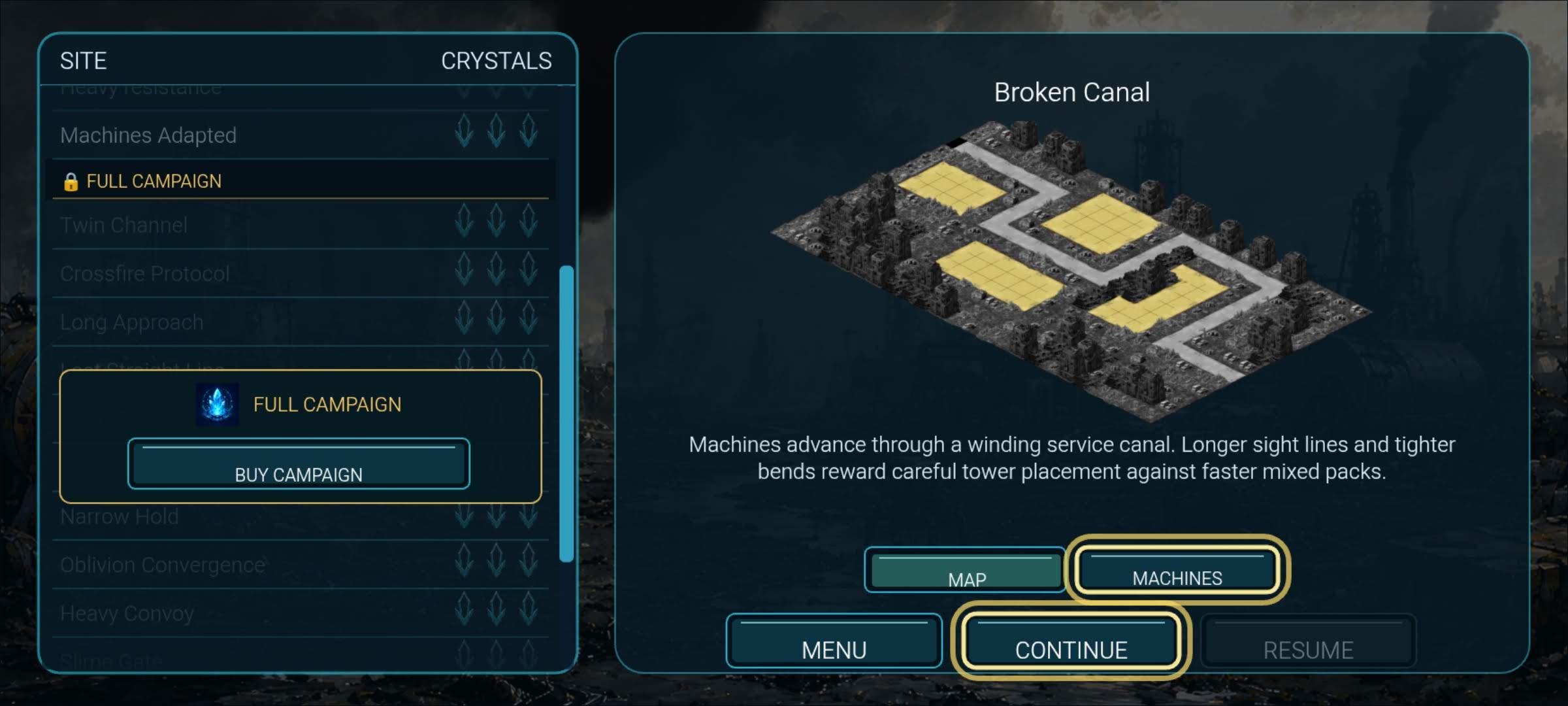
Open FULL CAMPAIGN
Öppna FULL CAMPAIGN
Select locked FULL CAMPAIGN in the site list, then tap BUY CAMPAIGN.
Välj låsta FULL CAMPAIGN i site-listan och tryck sedan BUY CAMPAIGN.
Step 2
Steg 2
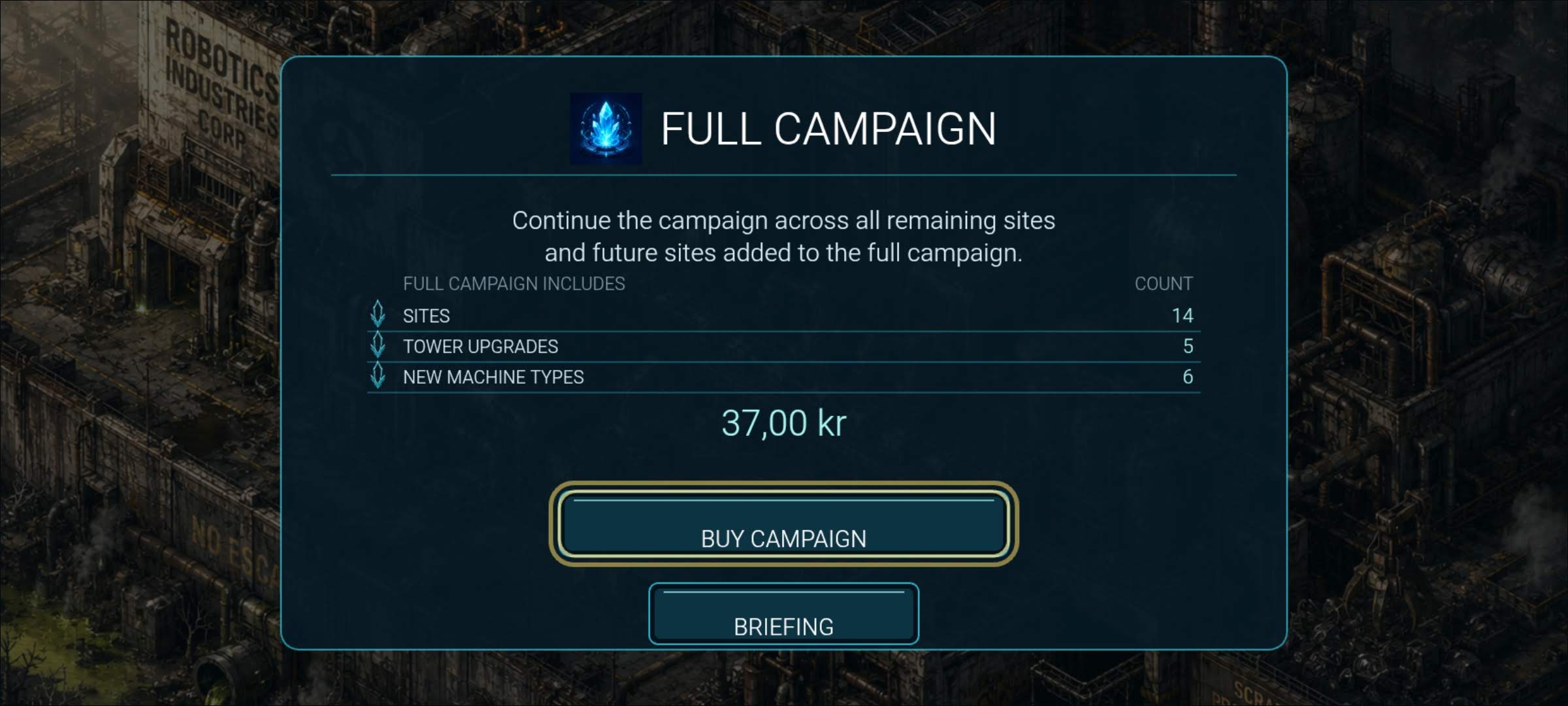
Confirm the in-game offer
Bekräfta erbjudandet i spelet
Review what Full Campaign contains and tap BUY CAMPAIGN again to start Google Play Billing.
Läs vad Full Campaign innehåller och tryck BUY CAMPAIGN igen för att starta Google Play Billing.
Step 3
Steg 3
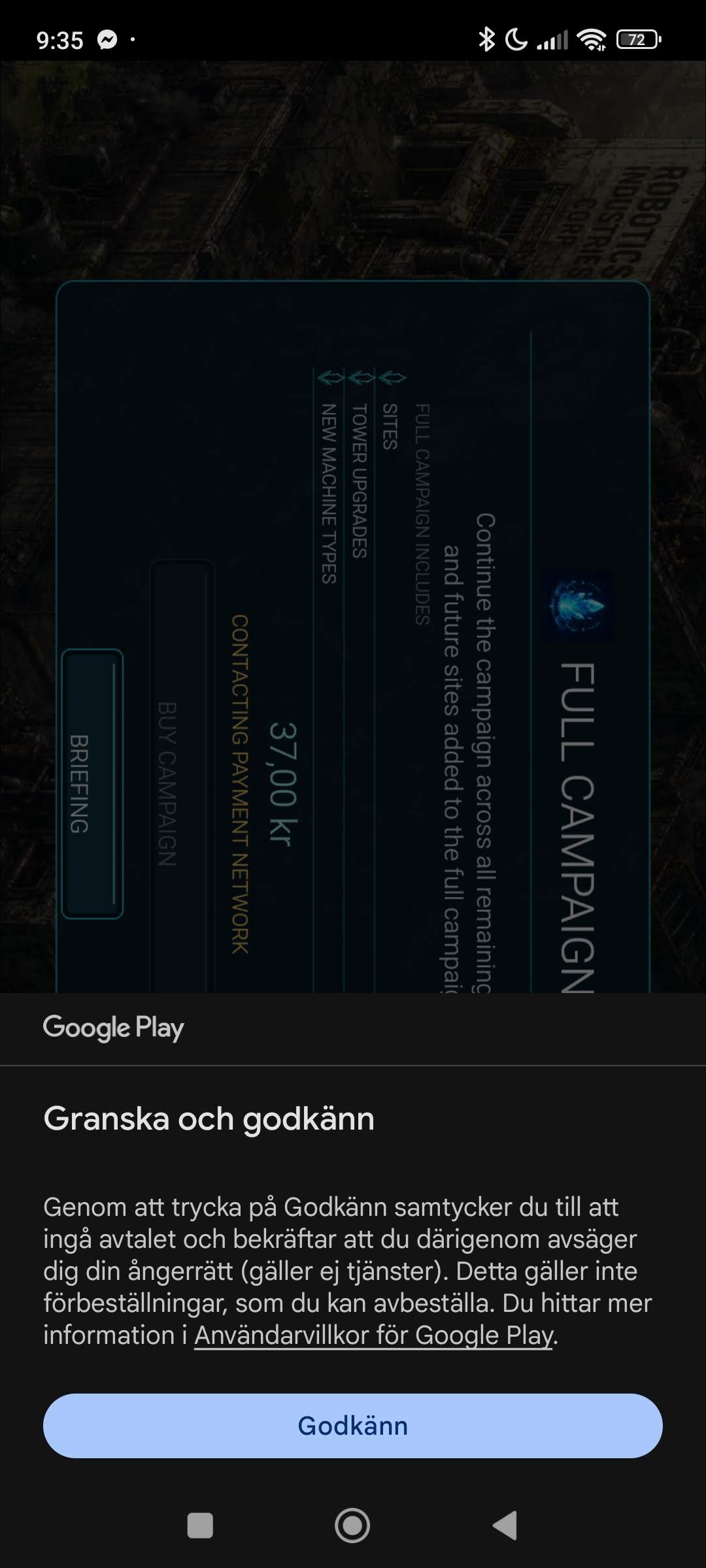
Approve in Google Play
Godkänn i Google Play
Google Play may show Review and approve. Tap Approve.
Google Play kan visa Granska och godkänn. Tryck Godkänn.
Step 4
Steg 4
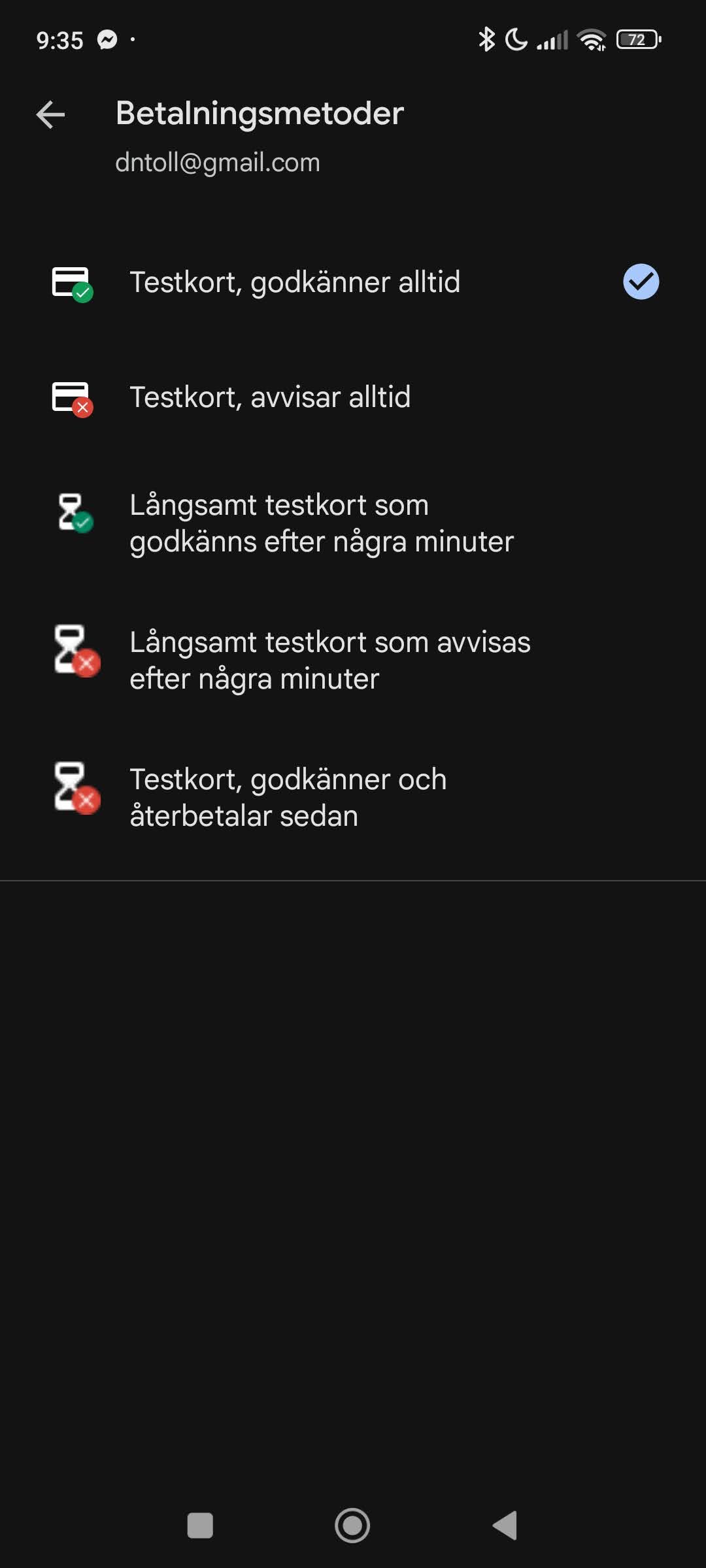
Choose Google’s test card
Välj Googles testkort
Under payment methods, choose Test card, always approves—never a real card.
Välj Testkort, godkänner alltid under betalningsmetoder – aldrig ett riktigt kort.
Step 5
Steg 5
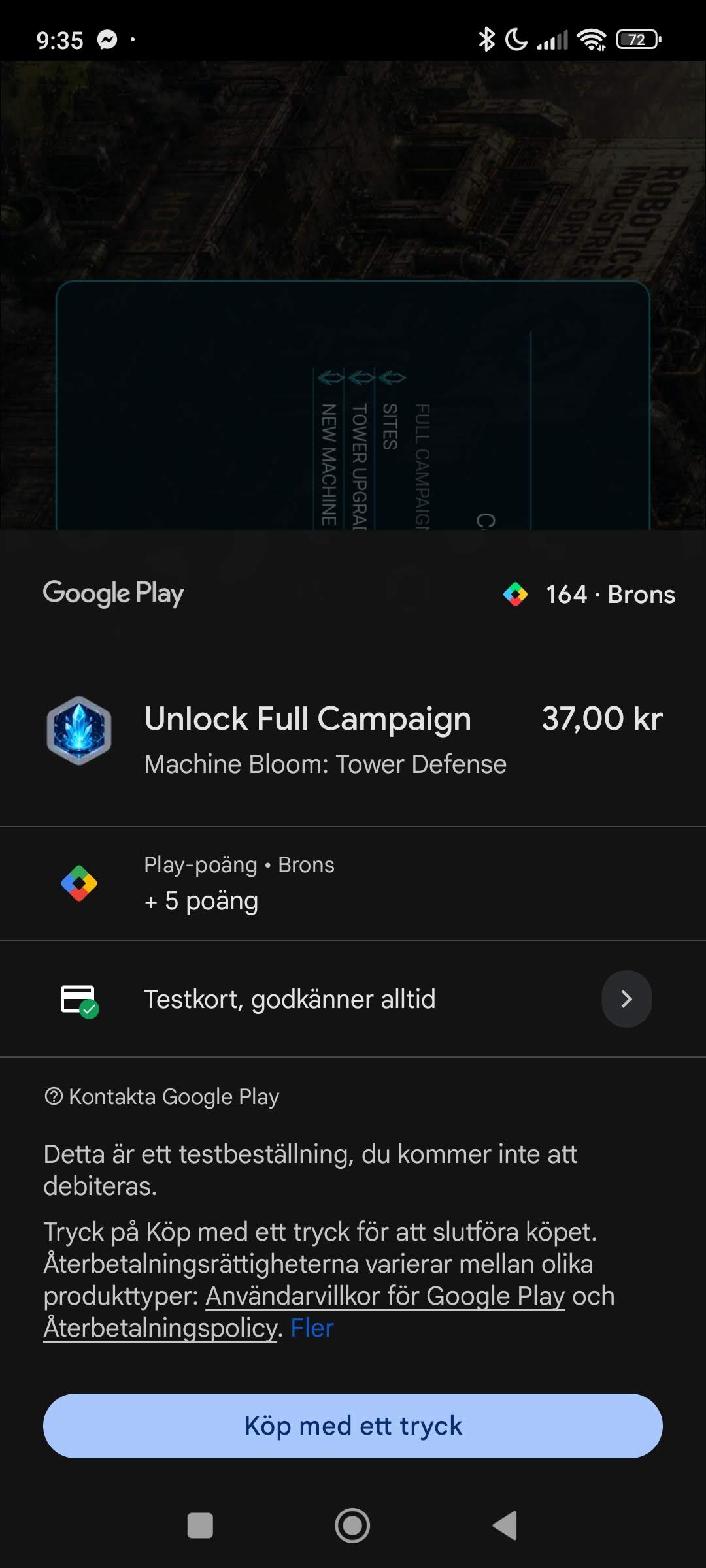
Complete the test purchase
Slutför testköpet
Confirm that Play identifies a test order and says you will not be charged. Tap 1-tap buy. Full Campaign will be available for the current test access period.
Kontrollera att Play beskriver en testbeställning och säger att du inte debiteras. Tryck Köp med ett tryck. Full Campaign blir tillgänglig under den aktuella perioden med teståtkomst.
If something looks wrong
Om något ser fel ut
Cancel the purchase and email contact@curiousengineerstudio.se. You can include your device model, Android version, and a screenshot without private information.
Avbryt köpet och mejla contact@curiousengineerstudio.se. Du kan bifoga enhetsmodell, Android-version och en skärmbild utan privata uppgifter.